
How to
Your system knows the order is on its way. Let it tell the customer.
The kitchen screen says “out for delivery”, the customer is still wondering where the food is, and someone on your team types updates by hand. Give your order system, CRM or booking tool one web address to call: the assistant sends the message and answers when the customer replies.
Thanks, Lukas! Order #4127 is confirmed: €27.80, delivery at about 19:40.
19:36
Your driver is about 2 minutes away.
Great, thanks!
Triggered by the order system
What it costs you today
“Where is my order?”
Every order without an update turns into a call or a message you have to answer in the middle of the rush.
Updates typed by hand
Confirmed, on the way, two minutes away: someone copies each one from one screen to another.
Reminders nobody sends
The booking system knows about tomorrow’s appointment. The customer has forgotten it.
The recipe
Four steps with the building blocks you already have in MyChatBot.
- 1Automations
Create a trigger for each event
On the Automations page, open Trigger Outreach and add a named trigger, such as Order Confirmation or Appointment Reminder. You can have up to 20.

- 2Automations
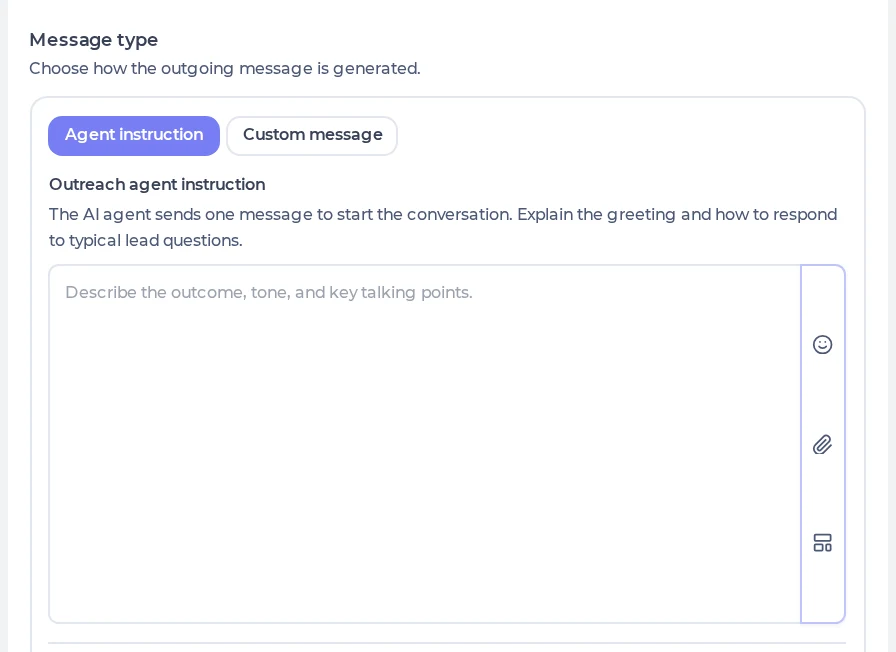
Choose the channel and the message
Write the exact text with {name} and {context} placeholders, or give the assistant an instruction and let it compose the message.
- 3Automations
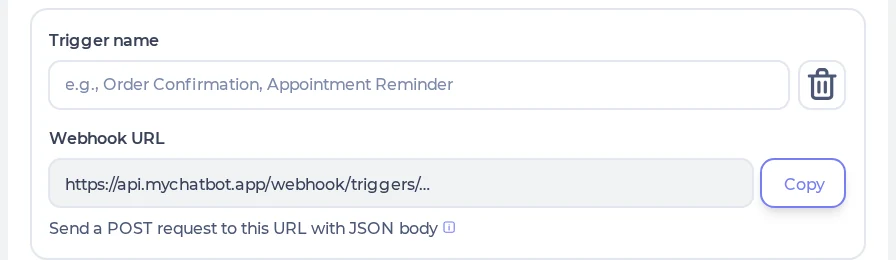
Point your system at the webhook URL
Save to get the trigger’s URL. Your system sends it a POST with the customer’s phone number, name and a line of context, such as the total and the delivery time.
- 4Automations
Send the first one to yourself
POST your own phone number with a test note and check that the message arrives. The preview shows the composed message first, with nothing sent.
What the customer sees
Your system fires the event, the assistant writes the message, and the customer can reply to it.
✓Order system → webhook: order #4127 confirmed
AssistantHi Lukas, your order #4127 is confirmed. Total €27.80, delivery at about 19:40. Live tracking: example.com/t/4127
✓Order system → webhook: driver nearby
AssistantYour driver is about 2 minutes away.
CustomerThanks! Can I pay by card at the door?
AssistantYes, the driver takes both card and cash.

 Or say it in ChatGPT or Claude
Open the Automations page so I can create a Trigger Outreach webhook for order confirmations, and tell me what my order system has to send to it.
Pizzeria Napoli Kaprun: order confirmations and “driver is about 2 minutes away” on WhatsApp
A restaurant in Austria. Its own ordering system triggers the assistant to send each guest a confirmation with the total, the delivery time and a live tracking link. 275 conversations since 15 October, 259 on WhatsApp.Questions owners ask
Do I need a developer?
Your system has to send one web request: a POST with a phone number, a name and a line of context. If your order system or CRM has a webhook setting, paste the URL there; otherwise it is a small job for a developer.
Can it message a customer who has never written to us?
Yes, on channels that can start a conversation: Personal WhatsApp, a Telegram account, SMS, email or a phone call. On WhatsApp Business, turn on Send as a WhatsApp template and choose a template Meta has approved. Instagram, Messenger and Telegram bots can only write to people who already have a chat with you.
What stops a customer from getting the same message twice?
If your system repeats the same event to the same trigger within 30 minutes, it is answered as a duplicate and nothing is sent.
How do I know the message went out?
Add a status callback URL and your system receives the result for every request: sent, failed or skipped, and why. The customer’s chat records it too.
Let the next order announce itself
Set-up is free. Create a trigger, run the preview and send the first test to your own phone.