
How to
Write to every lead from your Facebook and Instagram ads right away
You pay for each lead, and then it waits in a list until someone has time to call. Connect your lead forms: every submission is saved to your contacts, and the assistant writes to the person while they still remember the ad.
Lead form · Trial class
Hi Maria! You asked about a trial class. Have you done Pilates before?
No, first time. How much is it?
A trial class is €15. We have Wednesday at 18:00 or Saturday at 10:00.
Lead saved to Contacts
What it costs you today
You pay for leads that go cold
A lead answered the next day barely remembers the ad. You paid for it all the same.
Leads wait in a list
The form fills a list inside Meta. Someone has to export it and start calling.
Calls go unanswered
Someone who filled in a form between two reels will not pick up an unknown number. A message waits for them.
The recipe
Four steps with the building blocks you already have in MyChatBot.
- 1Automations
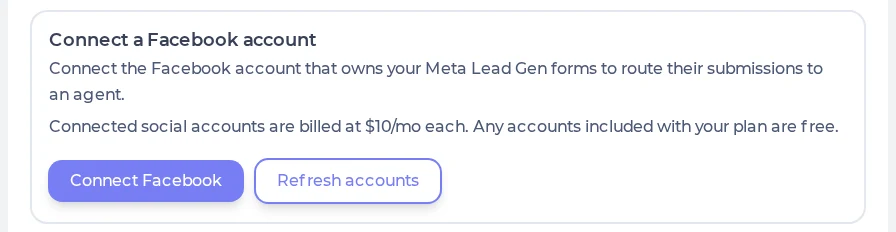
Connect the Facebook account that owns your forms
On the Automations page, open Lead Forms, click Connect Facebook and choose your Page.
- 2Automations
Enable the forms the assistant should handle
Your forms load with a lead count for each. Switch on Enable for the ones you want and pick the assistant that handles them.
- 3Automations
Choose the channel and the first message
Select Capture and send outreach, pick the channels that send the first message, and write an instruction for the assistant or the exact text.
- 4Automations
Send a test lead
Submit a test lead with Meta’s Lead Ads testing tool. It should appear in Contacts, and the assistant’s first message should go out.
What the customer sees
The first message mentions what they signed up for. The assistant takes it from there.
✓Lead form submitted · Trial class · Maria
AssistantHi Maria! You left a request for a trial class in our Instagram ad. Have you done Pilates before, or is this your first time?
CustomerFirst time. How much is it?
AssistantA trial class is €15 and lasts 50 minutes. Beginner groups meet on Wednesday at 18:00 and Saturday at 10:00. Which one suits you?
CustomerSaturday.
AssistantSaturday at 10:00 it is. Bring comfortable clothes; we have the mats.

 Or say it in ChatGPT or Claude
Open the Automations page so I can connect my Facebook lead forms to my assistant, and tell me what to choose there.
Questions owners ask
Are leads saved even if I enable no form?
Yes. Leads from the connected Page are always saved to Contacts. Enabling a form adds the assistant’s first message.
Which plan do I need?
Listing your forms needs the Ads Manager capability on the connected Facebook account, which comes with the Multipro and Corporate plans. A connected social account beyond those your plan includes is billed at $10 a month.
Which channel sends the first message?
One that can start a conversation from a phone number or an email address: Personal WhatsApp, a Telegram account, SMS, email or a phone call. Channels are tried in order, and the first one that delivers stops the rest.
What if Meta opens a Messenger chat after the form?
When that first message carries the phone number from the form and the lead was created within the last 15 minutes, the chat is linked to the same lead, so you do not get a second one.
Stop paying for leads nobody answers
Connect your forms, send a test lead and read the first message the way your customer will.