
How to
Let the assistant look things up in your own system
“Where is my order?” has an answer, and it lives in your system, not in the chat. Connect your own MCP server and tick the tools the assistant may use: it checks the order, the booking or the account while the customer is still there.
Hi! Where is my order 5531?
It left our warehouse this morning. The courier delivers on Thursday before 18:00.
Perfect, thank you!
Order 5531 · looked up in your system
What it costs you today
The answer is in another system
The customer asks on Instagram, the order lives in your back office. Someone has to look it up and type it over.
Status questions eat the day
“Where is my order?” “Is my repair ready?” Simple questions that still need a person with a login.
Chats never reach your CRM
What was promised in the chat stays in the chat, and the CRM shows half the story.
The recipe
Four steps with the building blocks you already have in MyChatBot.
- 1Integrations
Add your server
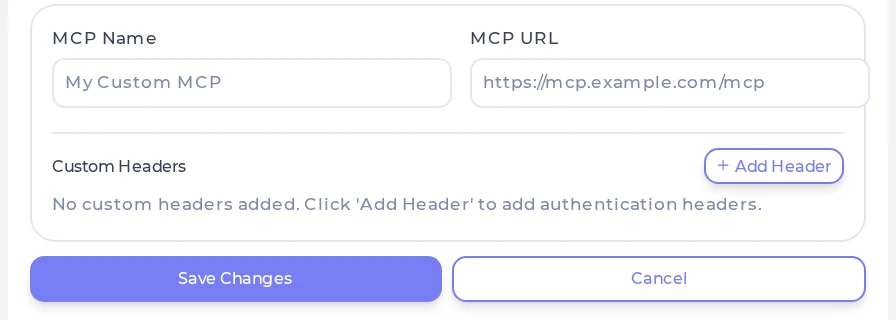
Open Integrations, pick the assistant and select Custom MCP. Enter a name, the server’s URL and the headers it needs, such as an API key.
- 2Integrations
Tick the tools the assistant may use
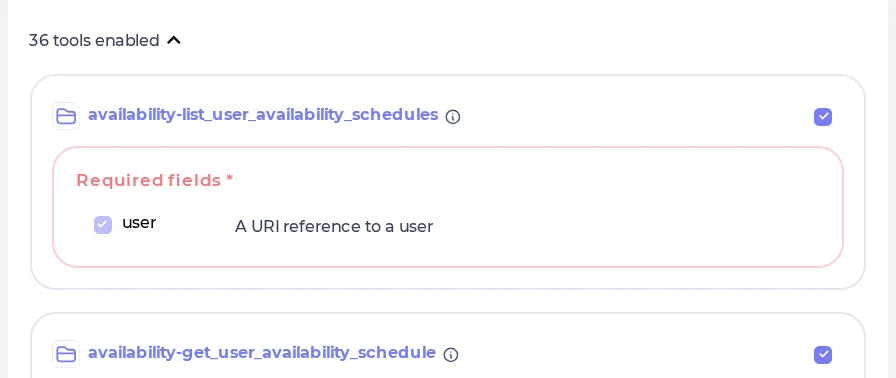
The server’s tools appear in a list. Only the ones you tick and save exist for the assistant, so leave out anything a customer should not trigger.
- 3Integrations
Send finished conversations to your CRM, if you need to
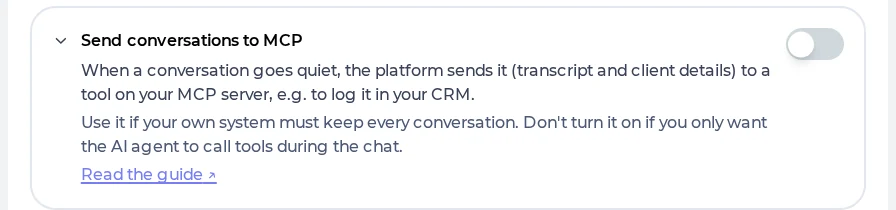
If your system must keep every conversation, switch on Send conversations to MCP and pick the tool that stores one. Most assistants do not need it.
- 4Integrations
Ask a question that needs the tool
Write to the assistant in a test chat, ask something only your system knows, and check that your server received the call.
What the customer sees
The customer asks, the assistant calls a tool on your server and answers with what came back.
CustomerHi, I ordered a rear wheel last week, order 5531. Where is it?
✓Your server · order status checked
AssistantOrder 5531 left our warehouse this morning. The courier delivers on Thursday before 18:00.
CustomerGreat, thanks!
AssistantYou are welcome. Write here if anything changes.

 Or say it in ChatGPT or Claude
Give me the link to the Custom MCP page for my assistant, and tell me what to enter there to connect my own server.
LikeBus sells bus tickets in chat through its own MCP server
LikeBus is a bus ticket booking service for travel across Europe and Ukraine. Through its own MCP server the assistant searches trips, books tickets, adds baggage and checks the payment status of a booking.Questions owners ask
What is an MCP server?
A small service that offers tools, such as “get order status”, in a standard way that assistants understand. If your team or your software vendor already has one, all you need is its URL.
My service asks for a sign-in instead of a key. Does that work?
Yes. A server that sits behind a sign-in, Calendly for example, shows a Sign in with … button instead of headers. After signing in, untick the tools customers should not be able to trigger.
Can I connect more than one server?
Yes. You can connect several servers to one assistant and choose the tools from each.
Which plan do I need?
Custom MCP is part of the Pro plan and above.
Give the assistant the answers your system already has
Connect the server, tick the tools and ask the first question yourself in a test chat.