
How to
Sell on Messenger without watching your Page inbox
People message a Facebook Page the moment they see a post or an ad, and expect an answer while they are still interested. Connect your Page and the assistant answers messages and comments from your catalog, then takes the order in the same chat.
Is the oak shelf from your ad still available?
Yes, €64, in stock. Shall I arrange delivery?
Yes. Oslo, Storgata 5.
Done. Your order is created.
Order #133 · €64
What it costs you today
The Page inbox is checked last
Instagram and WhatsApp get your attention first. Messenger waits until the evening, and so does the buyer.
Ad clicks go cold
Someone taps “Send message” on your ad and gets silence. You paid for that click.
Comments under posts stay unanswered
“How much?” under a post is a buyer asking in public. Left alone, it tells everyone else that nobody is there.
The recipe
Four steps with the building blocks you already have in MyChatBot.
- 1Channels
Connect your Facebook Page
Open Channels, choose your assistant and the Messenger tab, click Connect Messenger, then pick your business and Page and approve the request.

- 2Knowledge
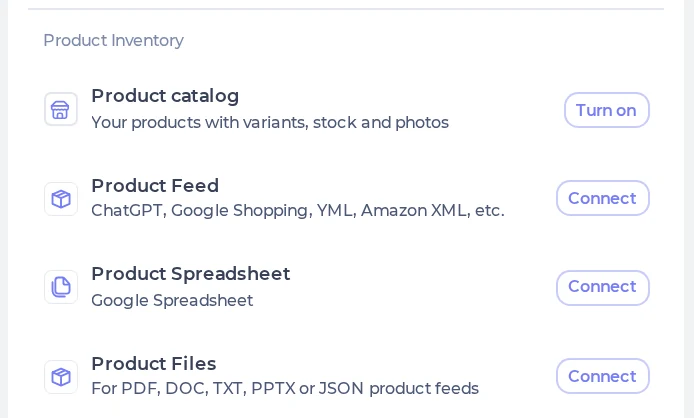
Load what you sell
Connect a product feed, a spreadsheet or your Shopify store, so the assistant quotes real prices and stock.
- 3Channels
Decide how comments are answered
Choose a fixed line or a reply written for each comment, and have the assistant continue with the person in private messages.
- 4Integrations
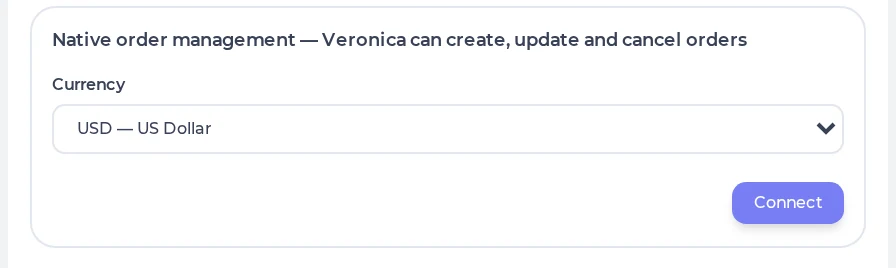
Switch on Orders
Choose the currency and the fields an order needs. Orders from this channel land on the same Orders page as every other channel.
What the customer sees
The assistant asks only for what is missing, then confirms the order.
CustomerHi, is the oak wall shelf from your ad still available?
AssistantYes, the 80 cm oak shelf is in stock, €64. Where should we deliver it?
CustomerOslo, Storgata 5.
AssistantOrder #133 is created: oak wall shelf, €64.
✓Order #133 · 1 item · €64

 Or say it in ChatGPT or Claude
Give me the link to connect my Facebook Page to my assistant, and set it to answer comments under my posts.
Questions owners ask
Will it answer comments under my posts?
Yes. It can reply under the post with a fixed line or with a reply written for that comment, and then continue with the person in Messenger. You can switch comment replies off.
Does it understand voice messages?
Yes. It answers voice messages, and can reply with voice if you switch that on.
Can I take over a chat myself?
Yes. Reply from the shared inbox and the assistant steps back in that chat until you hand it back.
Make your Facebook Page answer today
Set-up is free. Connect the Page and message it from another profile before your customers do.