
How to
The order goes from the chat into your system, with no retyping
The customer orders in a chat, and someone retypes it into the kitchen screen, with one wrong digit in the phone number. With an API Action the assistant collects the details, sends them to your system and tells the customer the order number that comes back.
Two Margheritas and a tiramisu, for pickup.
Sure. Your name and phone number, please?
Anna, +43 660 000 0000
Order 1042 is in the kitchen. Ready in 25 minutes.
Sent to your order system
What it costs you today
Every order is typed twice
Once by the customer in the chat, once by you into the order system. The second time is where the mistakes happen.
The customer waits for a confirmation
They ordered ten minutes ago and still do not know whether anyone has seen it.
Your system has no way into the chat
It can take an order over the web, but nothing links it to Instagram, WhatsApp or Telegram.
The recipe
Four steps with the building blocks you already have in MyChatBot.
- 1Integrations
Describe the action and where it goes
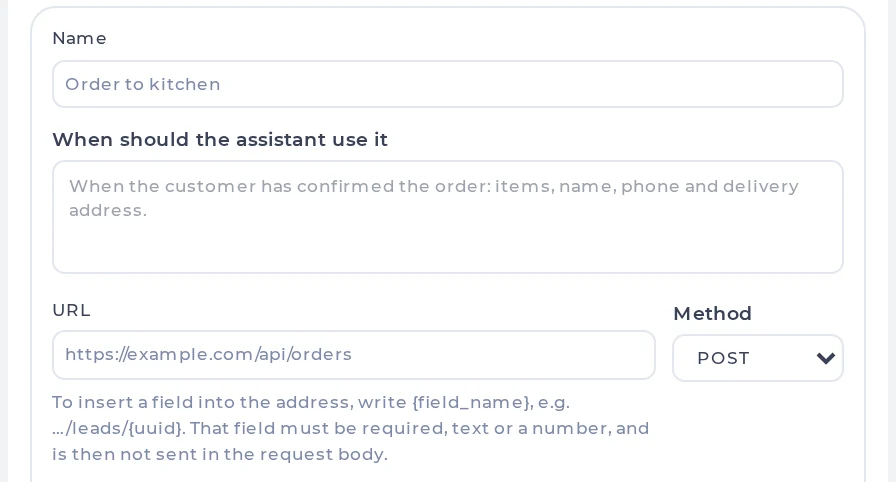
Open Integrations, pick the assistant and select API Action. Give it a name, say when to use it, and enter your system’s https:// address and the headers it expects.
- 2Integrations
List the fields to collect
One row per value your system needs: name, phone, pickup or delivery, the items. The assistant asks the customer for any required field that is missing.

- 3Integrations
Say what to do with the answer
Add a note such as “Quote order_number to the customer.” The assistant reads your system’s response and uses it in its next message.

- 4Integrations
Send a test
Click Send a test: it makes a real call to your system with sample data and shows the status and the response. Then place an order yourself in a test chat.
What the customer sees
The assistant asks only for what your system needs, sends it and tells the customer the answer.
CustomerHi! Two Pizza Margherita and one tiramisu for delivery, please.
AssistantWith pleasure. Could I have your name, phone number and address?
CustomerAnna, +43 660 000 0000, Example Street 1.
✓Sent to your order system · order number 1042 came back
AssistantThank you, Anna. Your order number is 1042, and it will be ready in 25 minutes.

 Or say it in ChatGPT or Claude
Give me the link to the API Action page for my assistant, and tell me what to fill in there so that orders go to my own system.
Pizzeria Napoli Kaprun: four API actions behind one assistant
Orders go to the kitchen, tables are reserved and order status is checked through the restaurant’s own system. 275 conversations since 15 October, 259 on WhatsApp.Questions owners ask
What does my system need?
An https:// address that accepts a request and answers within 10 seconds. The assistant sends the collected fields as JSON, together with the headers you entered.
What if my system refuses the order?
The assistant receives the error as well, so it tells the customer the order did not go through rather than pretend it did.
Can it look something up, not only create it?
Yes. An action can use GET, for example to read a status, and a value such as an order id can be written into the address.
How is this different from a Custom MCP server?
An API Action calls one address your system already has, and you describe the fields in a form. A Custom MCP server brings a set of tools of its own.
Which plan do I need?
API Action is part of the Pro plan and above.
Take the retyping out of every order
Describe the action, send a test to your own system and place the first order yourself in a test chat.